
Help / Integrations
Connect emeris to your other tools
Updated 20 September 2026
Three doors. Tokens open all of them, and you make tokens under Settings → Integrations.
Tokens
A token is a password for one tool. Make one per tool in Settings → Integrations, tick what it may do, and copy it once.
- Capture lets the tool add items to your inbox. Zapier, Shortcuts and scripts need this.
- Read lets the tool see your ledger. An AI assistant needs this. A Read token cannot add anything.
- Write lets the tool create and change tasks, projects and notes, in one workspace you pick when you make the token. An assistant that acts for you needs Read and Write. A Write token cannot touch your calendar or delete anything for good.
Tokens look like emr_ followed by 40 letters and digits. If one leaks, revoke it in Settings and make a new one; the old one stops working immediately. Send it as a header: Authorization: Bearer emr_…. If a tool can't set headers, put it on the URL as ?token=emr_… instead.
Capture into your inbox
Send a POST with a line of text to one address and it lands in your personal inbox. Any tool with a "webhook" or "HTTP request" step can do it.
POST https://api.emeris.app/functions/v1/inbox-webhook
Authorization: Bearer emr_…
Content-Type: application/json

{"text": "Call the accountant about Q3", "source": "zapier", "external_id": "row-1042"}| Field | Required | What it does |
|---|---|---|
text | yes | The item. Up to 2,000 characters. |
notes | no | Extra detail, up to 10,000 characters. |
url | no | A link, added to the notes. |
source | no | Name of the sending tool, e.g. zapier. Shown on the item. |
external_id | no | Your id for the item. Send the same id twice and you get one item, not two. An Idempotency-Key header does the same job. |
The body can be JSON or a plain form post (application/x-www-form-urlencoded), whichever your tool sends. The reply is JSON: 201 with the new item's id, or 200 if that external_id was already captured.
To check a token without adding anything, open the same address in a browser with ?token=emr_… on the end, or send a GET. You get your name and the token's permissions back.
Recipes
Zapier
- Pick any trigger, then add the action Webhooks by Zapier → POST.
- URL:
https://api.emeris.app/functions/v1/inbox-webhook. Payload type: json (form works too). - Data:
text= the thing to capture;source=zapier;external_id= the trigger's record id. - Headers:
Authorization=Bearer emr_….
Make
- Add an HTTP → Make a request module.
- URL as above, method POST, body type Raw, content type JSON.
- Request content:
{"text": "{{1.subject}}", "source": "make", "external_id": "{{1.id}}"}. - Add a header
Authorizationwith valueBearer emr_….
n8n
- Add an HTTP Request node, method POST, URL as above.
- Authentication: Generic → Header Auth, name
Authorization, valueBearer emr_…. - Body content type JSON with
text,source(n8n) andexternal_id.
iPhone Shortcut
- New shortcut: Ask for Input (text) → Get Contents of URL.
- URL as above. Method POST. Headers:
Authorization=Bearer emr_…. - Request body JSON:
text= Provided Input,source=shortcuts. - Add it to the share sheet and you can capture a web page from any app: set
urlto the shared URL.
Slack workflow
- In Slack, open Workflow Builder, start from a reaction or a form.
- Add the step Send a web request: method POST, URL as above.
- Headers:
Authorization=Bearer emr_…. Body:text= the message text,source=slack,external_id= the message timestamp.
Command line
curl -X POST https://api.emeris.app/functions/v1/inbox-webhook \
  -H "Authorization: Bearer emr_…" \
  -H "Content-Type: application/json" \
  -d '{"text": "Renew the domain", "source": "shell"}'
Publishing
Add a web address in Settings → Integrations → Outbound webhooks and emeris sends it a signed message when something happens. Use it as the trigger in Zapier, Make or n8n.
| Event | When | In data |
|---|---|---|
task.scheduled | A task is put on the calendar, by you or by autoschedule | task, event (calendar id, start, end, tz), via: manual or auto |
task.rescheduled | A scheduled task is moved in emeris | task, old_event, new_event |
task.unscheduled | A task is taken off the calendar | task, removed_event |
task.completed | A task is finished | task, completed_at, event if it was scheduled |
done.logged | Something is logged as done by hand | entry (id, title, logged_at, project) |
inbox.captured | An item lands in the inbox, from the app, email or a webhook | item (id, text, source) |
booking.created | Someone books time through a booking link | booking (id, link, start, end, tz, hosts). No guest name or email. |
Every message has the same shape:
{
  "id": "6f1c…",
  "type": "task.completed",
  "created_at": "2026-09-05T09:12:44+00:00",
  "user_id": "…",
  "api_version": "2026-09-01",
  "data": { "task": { "id": "…", "title": "Renew the domain", "project": { "id": "…", "title": "Company setup" } }, "completed_at": "…" }
}
Headers on each request: X-Emeris-Event (the type), X-Emeris-Delivery (unique per attempt), X-Emeris-Timestamp (unix seconds) and X-Emeris-Signature. Reply with any 2xx within 10 seconds. Anything else is retried after 1 minute, 5 minutes, 30 minutes, 2 hours and 12 hours, then dropped. After 20 dropped messages in a row the webhook pauses; re-enable it in Settings once the receiver is fixed.
Only public https addresses. emeris refuses http://, private and local addresses, and follows no redirects. Moves made directly in Google Calendar don't produce task.rescheduled; emeris reads those on the next Week view, not the moment they happen.
Check a signature
Take the timestamp header, a dot, and the raw body; HMAC-SHA256 it with your webhook secret; compare with the v1= value in the signature header.
JavaScript (Node)
import { createHmac, timingSafeEqual } from "node:crypto";

// rawBody must be the exact bytes received, not re-serialised JSON.
export function verifyEmeris(headers, rawBody, secret) {
  const ts = headers["x-emeris-timestamp"];
  const sig = (headers["x-emeris-signature"] || "").replace(/^v1=/, "");
  if (!ts || !sig) return false;
  if (Math.abs(Date.now() / 1000 - Number(ts)) > 300) return false; // 5-minute window
  const expected = createHmac("sha256", secret).update(`${ts}.${rawBody}`).digest("hex");
  return expected.length === sig.length &&
    timingSafeEqual(Buffer.from(expected, "hex"), Buffer.from(sig, "hex"));
}
Python
import hmac, hashlib, time

def verify_emeris(headers: dict, raw_body: bytes, secret: str) -> bool:
    ts = headers.get("X-Emeris-Timestamp", "")
    sig = headers.get("X-Emeris-Signature", "").removeprefix("v1=")
    if not ts or not sig:
        return False
    if abs(time.time() - int(ts)) > 300:
        return False
    expected = hmac.new(secret.encode(), f"{ts}.".encode() + raw_body, hashlib.sha256).hexdigest()
    return hmac.compare_digest(expected, sig)
Zapier, Make and n8n webhook triggers accept the message without checking; the signature matters when you write your own receiver.
Connect an AI assistant
emeris has an MCP server, the standard way an AI assistant plugs into a tool. Connect it with a Read token and the assistant can answer questions about your day, your week, your projects and your free time. Give the token Write as well and it can triage your inbox, create and update tasks and projects, and leave notes, in the one workspace you chose. One token, then one of two paths. About five minutes.
Path A
Claude Code The terminal tool. One command, no files to edit.Path B
Claude Desktop The Mac and Windows app. Edit one config file, restart the app.STEP 1Make a token (both paths)
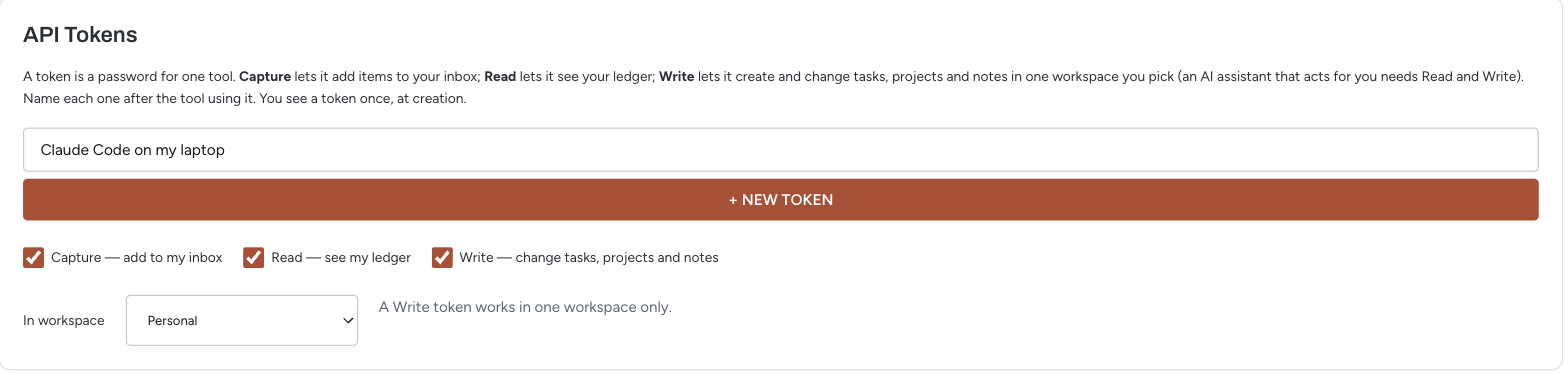
- Open Settings → Integrations in emeris and find API Tokens.
- Name the token after the tool that will use it: Claude Code on my laptop, Claude Desktop.
- Tick Read. Tick Write too if the assistant should act for you, then pick the workspace it may change. A Write token only ever works in that one workspace.
- Click New token.
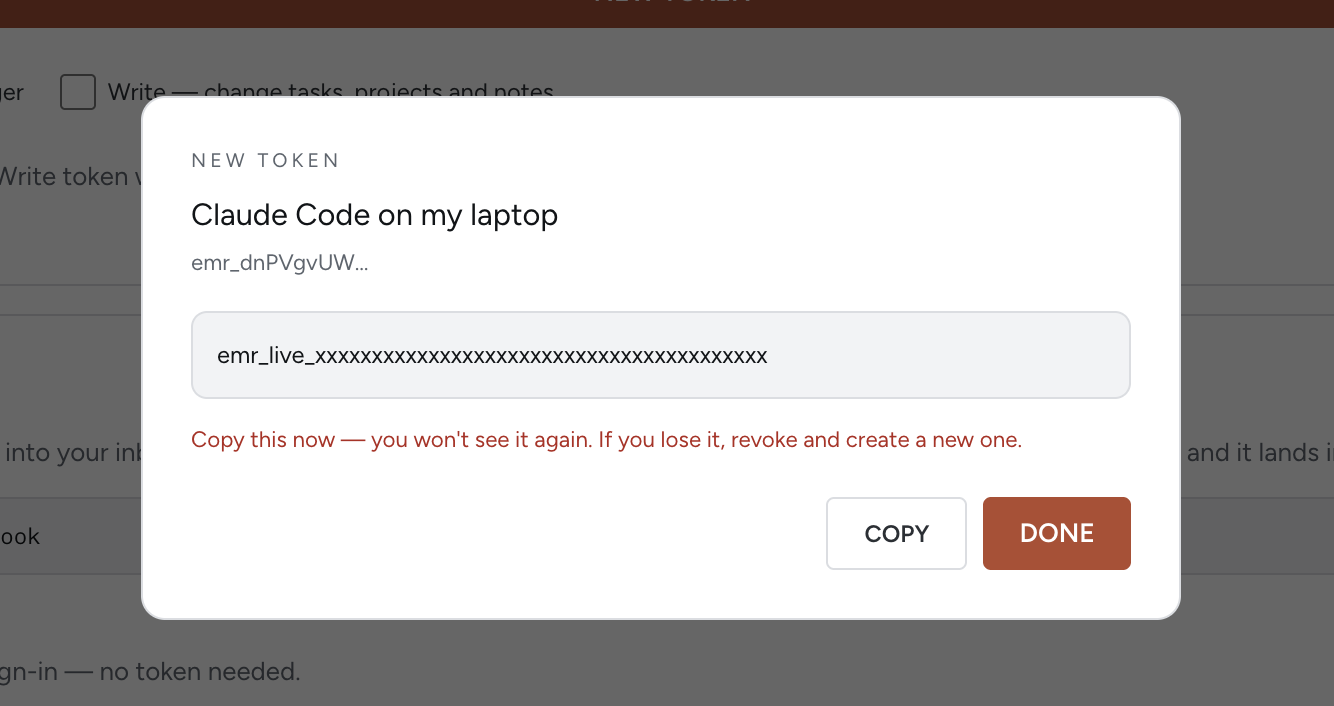
- Copy the token. It starts with
emr_and is shown once. If you lose it, revoke it and make another.
Path A · Claude Code · terminal
A1Add the server
Paste this in a terminal with your token in place of emr_…. It saves the connection for the folder you are in, so run it from the folder where you use Claude Code, or add -s user to make it available everywhere.
$ claude mcp add --transport http emeris https://api.emeris.app/functions/v1/mcp \
    --header "Authorization: Bearer emr_…"
Added HTTP MCP server emeris with URL: https://api.emeris.app/functions/v1/mcp to local config
Headers: {
  "Authorization": "[REDACTED]"
}
A2Check it connected
Claude Code will tell you straight away whether the token was accepted:
$ claude mcp list
Checking MCP server health…

emeris: https://api.emeris.app/functions/v1/mcp (HTTP) - ✔ Connected
If it says ✘ Failed to connect with HTTP 401 and invalid token, the token was mistyped or revoked. Run claude mcp remove emeris, make a new token, and add it again.
Inside a Claude Code session, /mcp shows the same thing, with the tool list: 11 tools for a Read token, 24 for Read and Write.
A3Ask it something
Start claude in any folder. Name emeris in the prompt the first time so it reaches for the right tools:
> Using emeris, what's on today, and which of my active projects have no next action?Now skip to Try it for prompts that do real work.
Path B · Claude Desktop · app
Desktop's own config can't send a token header to a remote server, so it goes through a small bridge called mcp-remote. The bridge runs on Node.js, so that has to be installed first.
B1Check Node.js is installed
Open a terminal (Terminal on Mac, PowerShell on Windows) and type:
$ node -v
v22.16.0
Any version 18 or newer is fine. If you get command not found, install it from nodejs.org and try again.
B2Open the config file
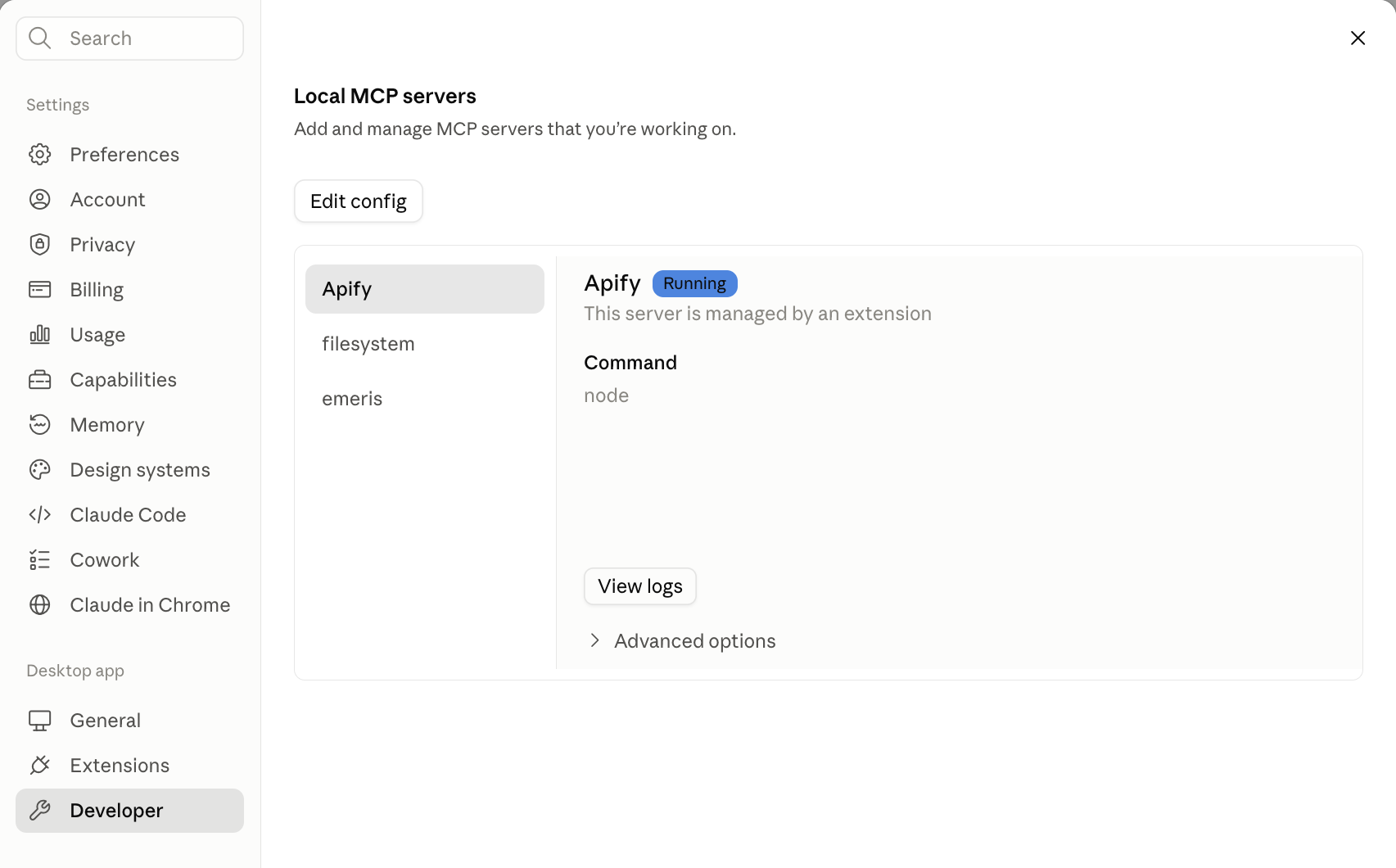
In Claude Desktop, open Settings → Developer. Under Local MCP servers, click Edit config. That reveals a file called claude_desktop_config.json. Open it in any text editor.
B3Paste the emeris block
Put this in the file with your token in place of emr_…. If the file already has an mcpServers section, add the "emeris" entry inside it rather than making a second one.
{
  "mcpServers": {
    "emeris": {
      "command": "npx",
      "args": [
        "-y", "mcp-remote",
        "https://api.emeris.app/functions/v1/mcp",
        "--header", "Authorization: Bearer emr_…"
      ]
    }
  }
}
Save the file.
B4Restart and check
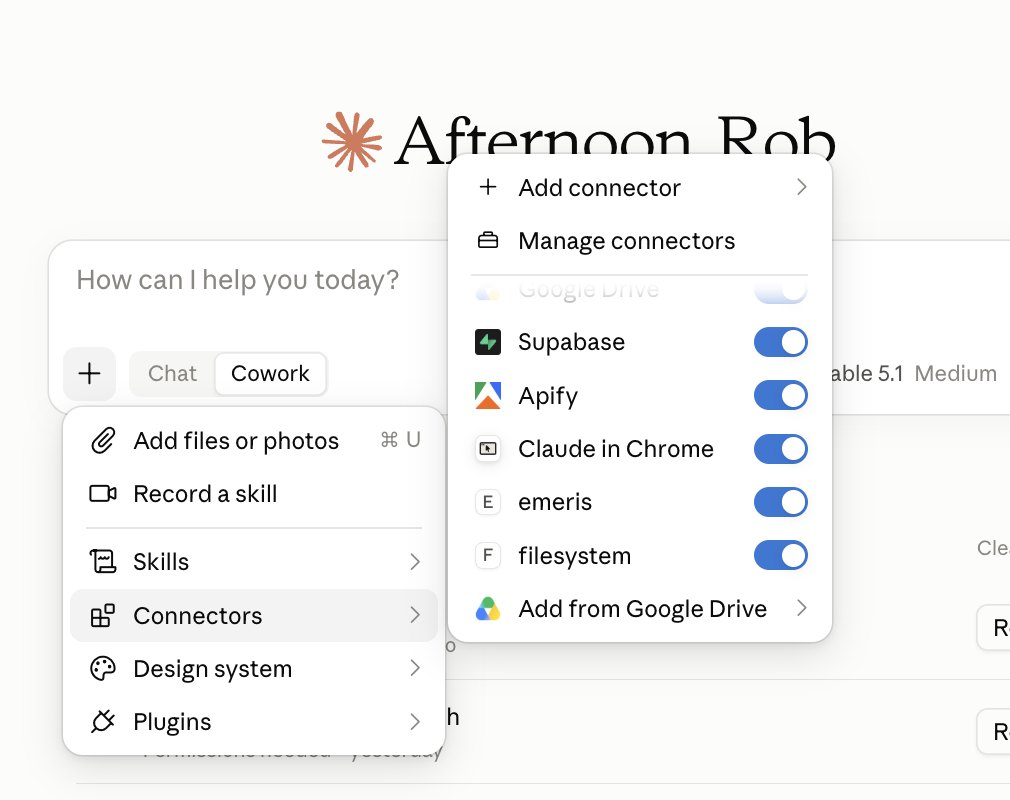
Quit Claude Desktop fully (on Mac, Cmd+Q, not just the window's close button) and open it again. The first start takes a few seconds while the bridge downloads. Then in a new chat, click the + under the message box and choose Connectors. emeris should be in the list with its switch on.
B5Ask it something
Name emeris in the prompt the first time so it reaches for the right tools: "Using emeris, what's on today, and which of my active projects have no next action?" Then see Try it below.
Claude.ai, or Claude Desktop without the config file
Claude's custom connectors take the token on the end of the URL, so there is nothing to install. When you make a Read or Write token, the New token dialog shows a connection URL with the token already in it. Copy it there; it isn't shown again.
- In Claude, open Settings → Connectors and choose Add custom connector.
- Name it emeris and paste the whole connection URL, the
?token=…part included. - Leave the OAuth client ID and secret blank. The token in the URL is the sign-in.
- Save, then start a new chat. emeris is in the connectors list.
https://api.emeris.app/functions/v1/mcp?token=emr_…Anyone holding that URL holds the token, so treat it like a password. Path B keeps the token in a header if you'd rather it stayed out of the URL.
Cursor
Cursor sends the token header directly, like Claude Code. Add this to ~/.cursor/mcp.json (or the project's .cursor/mcp.json), then check Cursor Settings → MCP shows emeris with a green dot:
{
  "mcpServers": {
    "emeris": {
      "url": "https://api.emeris.app/functions/v1/mcp",
      "headers": { "Authorization": "Bearer emr_…" }
    }
  }
}
Try it
A read-only warm-up:
Using emeris, what's on today, and which of my active projects have no next action?With a Write token, a real piece of work:
Using emeris, read my inbox and my active projects. For each inbox item that's a clear
next action, create a task with a size, energy level and context, attached to the right
project if one fits. Leave anything ambiguous in the inbox and tell me why. Then give me
a short summary of what you created.
Other things to ask: "What did I finish this week?", "When am I free on Thursday?", "Add a note to the launch project with today's decisions", "Mark the invoice task done". Everything the assistant creates shows up in emeris straight away, with notes signed as you.
If it doesn't connect
- "invalid token" or "token revoked" — the token was mistyped, or you revoked it. Make a new one and paste it again. In Claude Code this shows as ✘ Failed to connect … HTTP 401 in
claude mcp list. - "token lacks the 'read' or 'write' scope" — the token only has Capture. Make one with Read.
- "not found" — integrations aren't switched on for your account yet. Ask us.
- "this token is not pinned to a workspace" — a Write token needs a workspace. Make a new one and pick it.
- Claude Desktop shows nothing — check Node.js is installed (
node -vin a terminal), that the JSON has no stray commas, and that you fully quit the app before reopening it. Desktop's logs are under Settings → Developer → Open Logs Folder. - A custom connector won't save or shows no tools — check the whole connection URL went in,
?token=…included, and that the OAuth fields are empty.
What the assistant can see
| Tool | Answers |
|---|---|
get_today | The day's timeline, Top 3, next actions by context, done today |
get_week | Seven days of task blocks, meetings, done counts and hours by project |
list_tasks, search_tasks | Tasks by status, project, context; title and notes search |
get_done_log | What was finished, with its duration, project and source |
list_projects, get_review_state | Projects and their next actions; what a weekly review would look at |
get_task, get_project | One task or project in full, with its notes thread |
get_availability | Your own free windows from your calendars |
What the assistant can change (Write)
| Tool | Does |
|---|---|
create_task, update_task | Add a task to the inbox or someday; change its title, description, context, size, energy, project, due date, priority or status |
complete_task, uncomplete_task | Mark a task done (it lands in the done log and fires task.completed), or reopen it |
trash_task, restore_task | Move a task to the trash and back |
create_project, update_project | Add a project; change its title, outcome, description, status, horizon or health |
archive_project, unarchive_project | Take a project off the board and back |
add_task_note, add_project_note | Leave a note on a task or project, as you |
capture | Drop a thought into your inbox |
What a Write token can't do. Put a task on the calendar, move or remove a calendar event, delete anything for good, or reach outside the one workspace it was made for. Every change it makes runs under your own permissions in that workspace, so it can't do anything you couldn't do yourself.
Claude Code and Cursor send the token as a header. Claude.ai's custom connectors can't set one, so they carry it on the URL as ?token=; Claude Desktop can go either way, as a custom connector or through the mcp-remote bridge above.
Basecamp
Connect Basecamp under Settings → Calendar and two things sync, in opposite directions.
Your time goes out. emeris mirrors your busy blocks into a Basecamp schedule, so colleagues looking there see when you are taken. Free a slot in emeris and it frees in Basecamp within seconds. A sweep every half hour catches anything changed directly in Google Calendar.
To-dos come in. Basecamp to-do lists you map are pulled in as emeris tasks, checked hourly. Busy entries the mirror itself created are never imported back, so your own blocks cannot round-trip into tasks.
Both have a Sync now button in Settings if you would rather not wait.
GitHub issues
Every issue in a repository becomes a task in emeris, and the task follows the issue: open it and the task appears, close it and the task is done. A GitHub Action in the repository does the sending; emeris needs no connection to GitHub.
Who owns what. GitHub owns the title and whether the task is open. emeris owns the planning: which column of open it sits in, size, energy, project, due date, schedule, notes. A task that follows an issue carries a ⇄ GitHub chip, its title is read-only, and in place of Done and Trash it offers Close on GitHub. Close the issue there and the task is done here a few seconds later. Close it as not planned and the task goes to the trash. Reopen it and the task comes back to the inbox. Detach in the task drawer turns it into an ordinary task; GitHub stops updating it.
Set it up. Make a Write token pinned to the workspace the tasks should land in. In the repository, add it as the secret EMERIS_TOKEN. To file the tasks into a project, add its id as the variable EMERIS_PROJECT_ID; without one, or with an id emeris doesn't recognise, tasks arrive without a project. Then add this workflow as .github/workflows/emeris.yml:
name: emeris
on:
  issues:
    types: [opened, edited, closed, reopened, deleted, milestoned, demilestoned]

jobs:
  sync:
    runs-on: ubuntu-latest
    steps:
      - name: Send the issue to emeris
        env:
          EMERIS_TOKEN: ${{ secrets.EMERIS_TOKEN }}
          EMERIS_PROJECT_ID: ${{ vars.EMERIS_PROJECT_ID }}
          ISSUE: ${{ toJSON(github.event.issue) }}
          ACTION: ${{ github.event.action }}
          REPO: ${{ github.repository }}
        run: |
          body=$(jq -n --arg repo "$REPO" --arg action "$ACTION" --arg project "$EMERIS_PROJECT_ID" --argjson issue "$ISSUE" '
            ($issue.state_reason // "completed") as $reason
            | (if $action == "deleted" then "not_planned"
               elif $issue.state == "closed" then
                 (if $reason == "not_planned" or $reason == "duplicate" then "not_planned" else "completed" end)
               else "open" end) as $state
            | {
                source: "github",
                external_id: ($repo + "#" + ($issue.number | tostring)),
                state: $state,
                title: $issue.title,
                description: ($issue.body // ""),
                url: $issue.html_url
              }
            + (if $project != "" then { project_id: $project } else {} end)
            + (if $issue.milestone.due_on then { due_date: $issue.milestone.due_on[0:10] }
               elif $action == "demilestoned" then { due_date: null }
               else {} end)
          ')
          curl --silent --show-error --fail-with-body \
            -X POST https://api.emeris.app/functions/v1/external-task \
            -H "Authorization: Bearer $EMERIS_TOKEN" \
            -H "Content-Type: application/json" \
            -d "$body"
A milestone with a due date sets the task's due date. Issues closed before the workflow existed are left alone: closing one later does nothing, because there is no task to close.
The endpoint, for other tools. The workflow is a plain POST that any script can make.
POST https://api.emeris.app/functions/v1/external-task
Authorization: Bearer emr_…        (a Write token)
Content-Type: application/json| Field | Required | Notes |
|---|---|---|
source | yes | github is the only value today. |
external_id | yes | The issue's key, e.g. owner/repo#123. One task per key per workspace. |
state | no | open (default), completed or not_planned. |
title | on create | Up to 2,000 characters. Later calls rename the task. |
description | no | Used when the task is created, then it's yours to edit. |
url | no | Where the chip and the Close link point. |
project_id | no | Used when the task is created. An id not in the workspace is ignored. |
due_date | no | YYYY-MM-DD; null clears it. |
The reply is 201 when a task was created and 200 otherwise, with the task's id, status and whether anything changed. A closed state for an issue emeris has never seen is a 200 that changes nothing.
Limits and errors
| Reply | Meaning |
|---|---|
401 | No token, an unknown token, or a revoked one. |
403 | The token exists but lacks the permission: Capture for the inbox address, Read for the assistant. |
404 | Integrations aren't switched on for this account yet. |
413 | Too big: the body is over 32 KB, or a field is over its limit. |
422 | The request was understood but can't be applied: the GitHub endpoint was given a bad field, or the token's owner can't write to that workspace. The reply says which. |
429 | Slow down. Capture and the GitHub endpoint allow 60 requests a minute per token and 1,000 a day; the assistant allows 120 calls a minute. The Retry-After header says how long to wait. |