
A holistic rethink of teams, time and energy.
emeris is the time ledger for founders and small teams. Capture everything, let your calendar do the scheduling, and keep a permanent record of where the hours went. Next week gets planned from what happened, not from a list.
That didn't save. Email hello@emeris.app and we'll add you by hand.
30-day free trial · Every feature · No credit card
Good evening — 5h 15m on the record so far, 2h still planned.
"You don't have to see the whole staircase, just take the first step."
Your calendar is your source of truth, but often unconnected from your tools.
Task tools tell you what's left. Calendar planners tell you where today's work might fit, then forget it by tomorrow. Almost nothing tells you where the week went, or whose time is free. emeris answers all four from one calendar.
What's left, and when will it fit?
Work lands by email, in meetings and in your head. emeris catches it in one inbox, gives each item a size and an energy level, and puts it on your calendar as a real event. Once it has a slot, it's a plan.
Where did the week go?
Finished work stays on the calendar. Unplanned work, like the hard call or the great 1:1, gets logged back in with one line. You can read the week by project or by workspace and see whether the plan held.
Whose time is actually free?
Booking links read every host's calendar, so a slot only appears when everyone is free, shown in the visitor's time zone. Delegates act on your calendar without seeing your settings. The team pools its hours.
Capture → Clarify → Collaborate → Complete
Context carries from capture to completion. Workspaces hold projects, projects hold tasks, and each carries its owner, its outcome, its dependencies and its history, so everyone works from the same picture. If it's on the calendar, it's real.
Capture everything
Forward an email, type it in the app, share it from your phone, or send it from Zapier, Slack or a script. Everything lands in an inbox that asks nothing of you yet.
Clarify in seconds
Give it a size and an energy level. Add a project, a priority or this week's Top 3 if it matters. Delegate it, defer it, or finish it on the spot.
Collaborate where you are
Put it on the calendar and it becomes real for everyone. Assign it to a teammate, give a client or investor guest access to that one project, and let the tools you already run stream in and out, whether that's Google, Basecamp, Zapier or a webhook. emeris fits the way you work today.
Complete, and keep it
Finish the task and it turns green on your calendar for good. Log the things that were never tasks too. Every week ends with an account of where the hours went, by project, and next week gets planned from it.
Four levels. One ledger.
Zoom from 50,000 feet to a Tuesday afternoon.
Workspaces hold projects, projects hold tasks, and collaboration is how work and time get in and out. At every level the same three questions get answered: what lives here, who is in the room, and what you get for keeping it here rather than in your head.
Workspace
The surface everything hangs off. Company, client, family, personal.
- Projects, each with its outcome and horizon
- People: members, their roles, their hours
- Calendars mapped in, and a Home with two layouts: Planner and Console
- Members as Editor, Admin or Viewer; delegates act on your behalf
- Outsiders are not here; they get in one level down
- Context switching with a click, or all of it stacked in one view
- The 50,000-foot view: every project, its progress, its people
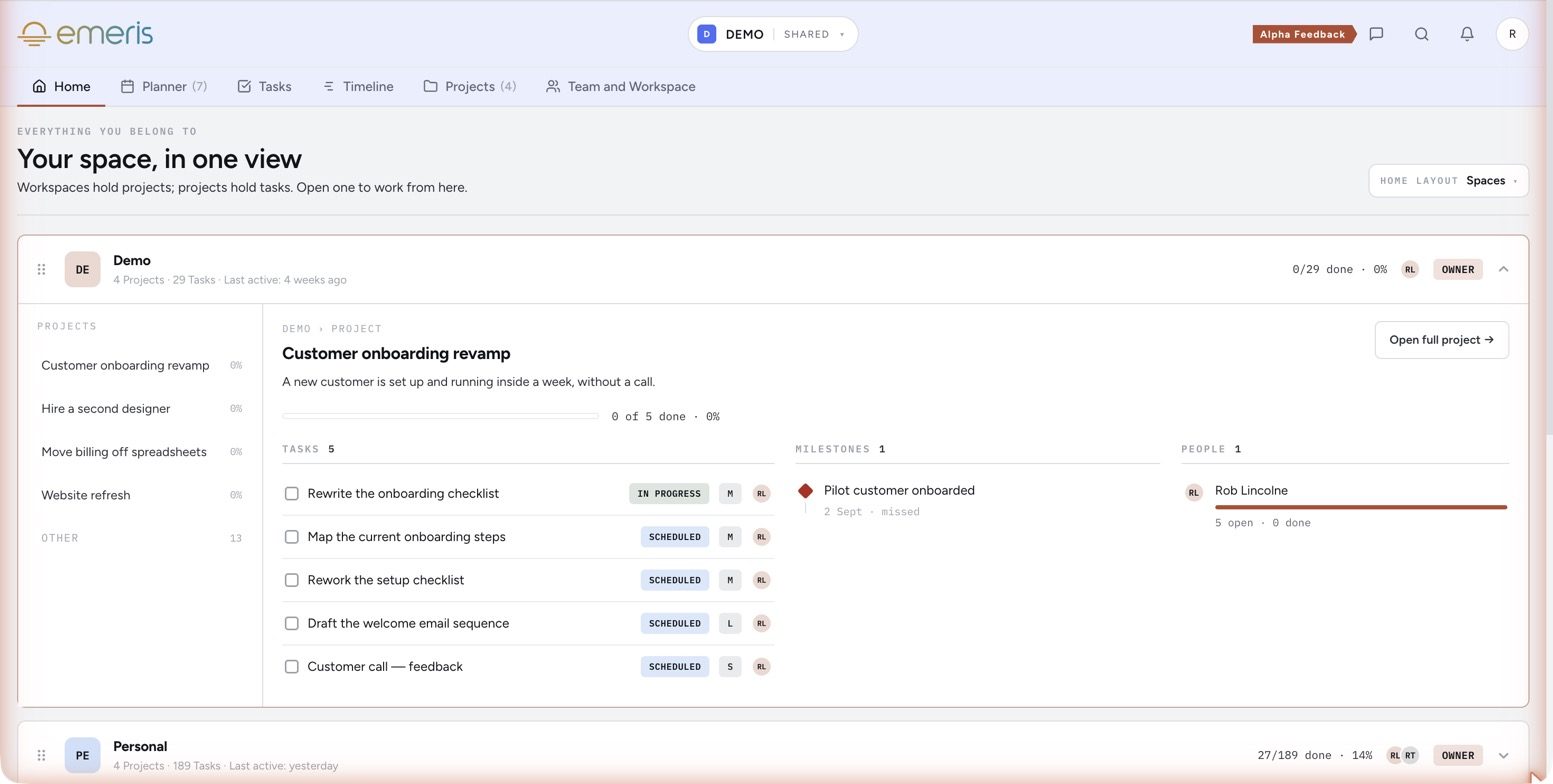
Spaces: every workspace, its projects and its people, on one screen. The Demo card is open.
One life, several contexts, no leakage.
Open the company and the family disappears. Open the family and the client work does. Or stack every workspace into one combined view when you want the whole picture.
Membership is per workspace, so a co-founder sees the company and nothing else, and outside people never get in at this level at all: they're invited to a single project.
Every workspace schedules onto the same hours, so a client deadline and a school pickup can never be booked on top of each other. The ledger is one, however many surfaces you keep.
Project
A stated outcome on a horizon. The unit you invite outsiders to.
- The outcome: what done looks like, written down
- A horizon: 1–3, 3–6 or 6–12 months, and a status
- Milestones, blockers, a timeline, and the tasks that roll up into its progress bar
- An owner, always, and teammates assigned to its tasks
- Guests: a client or investor sees this project and nothing else
- Projects by horizon: the runway view, what's at risk and why
- Deadlines where the whole team sees them; stakeholders kept close without opening your calendar to them
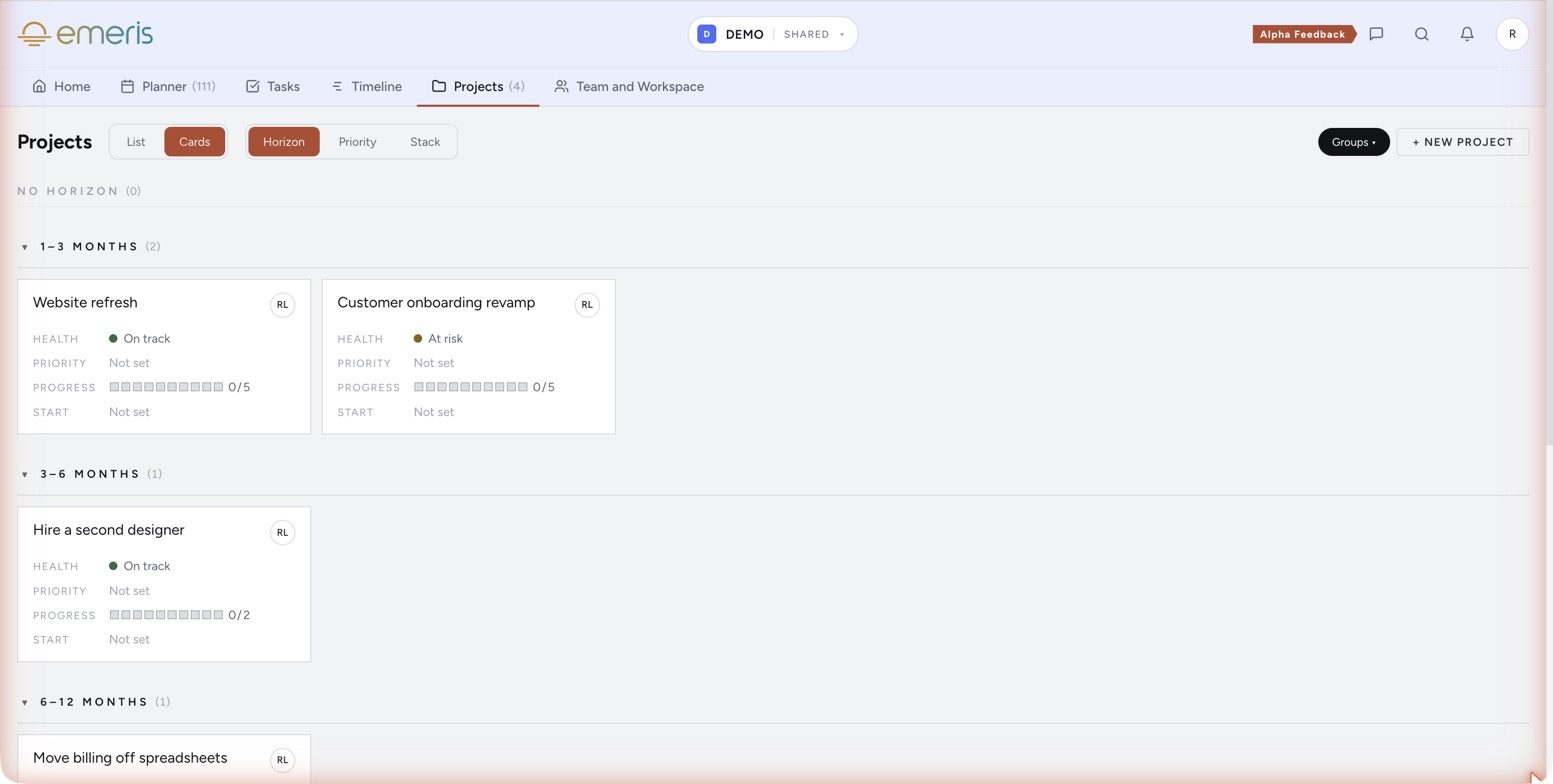
Every project in flight, grouped by horizon, with health and progress on the card.
Task
The unit that lands on a calendar. If it's scheduled, it's real.
- Size and energy, so it can be placed; priority P1–P4 and a star for the week's Top 3
- Owner, due date, notes, the email or webhook it came from, and its slot on the calendar
- Sub-tasks: pieces with their own size and slot, rolling up to the parent
- The assignee: one name on every row; a delegate clarifying and scheduling for you
- Sub-tasks split across people while the parent keeps one owner
- Capture from anywhere without deciding anything yet; autoschedule that respects your hours and energy
- A Kanban of next actions, and progress that rolls up from the same tick: task, project, workspace
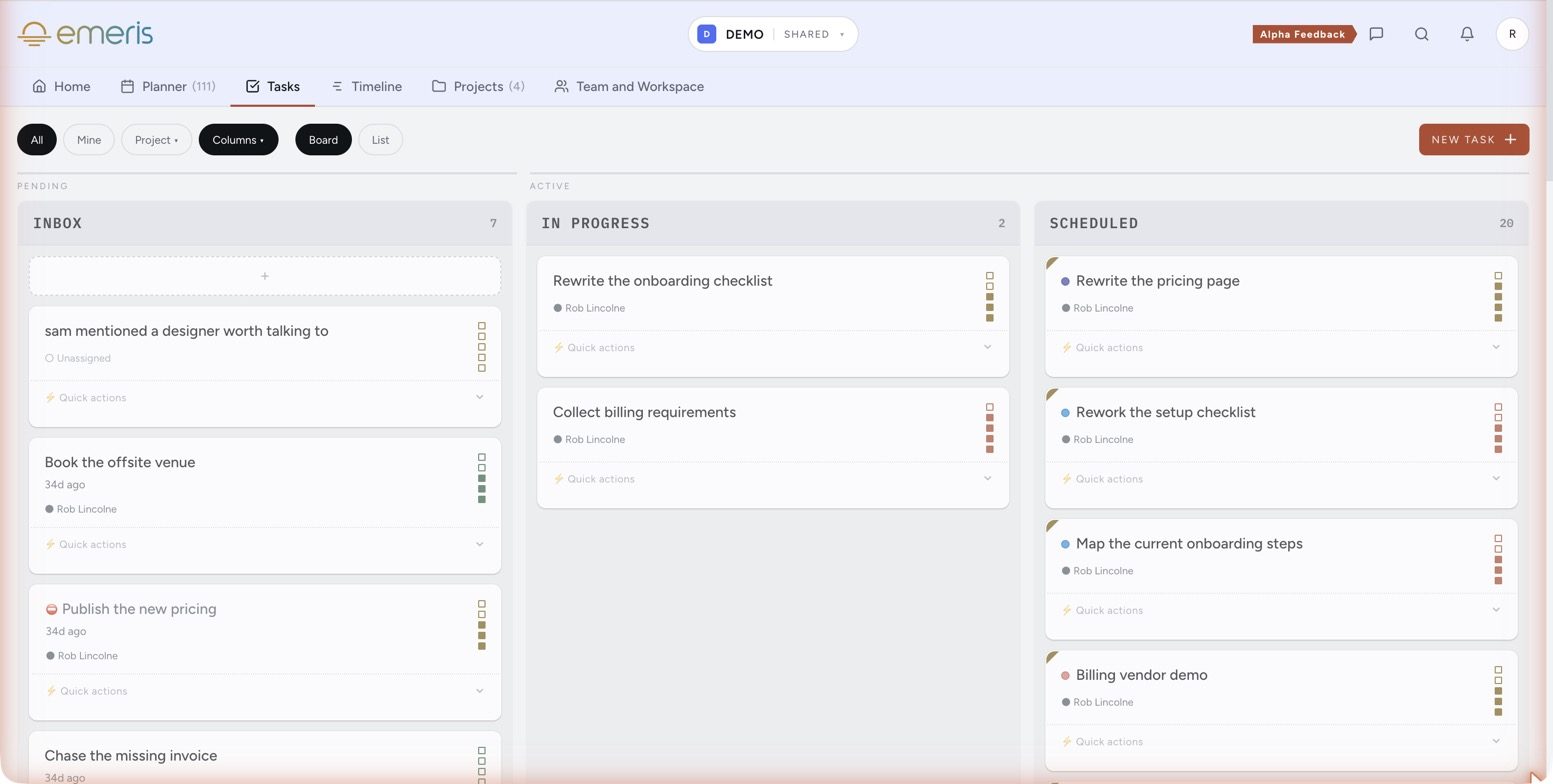
A Kanban built around next actions: Inbox, In progress, Scheduled.
Collaboration
The doors into the ledger, and out of it. Who gets in, how far, and how work and time arrive from other people and other tools.
- Workspace roles: Editor, Admin or Viewer. A Viewer is read-only across the whole workspace
- Project guests: a client, investor or supplier sees one project's outcome, tasks, milestones and timeline, and nothing beside it
- Booking links: someone else puts time on your calendar; shared links check every host's hours
- Email: forward a thread and it becomes a task, attachment and all
- Tasks from others: a teammate assigning, a delegate acting for you, a webhook from Zapier or Slack
- MCP: Claude or any assistant reads the week without touching it
- Outbound webhooks and Basecamp sync push what's done to the tools you already run
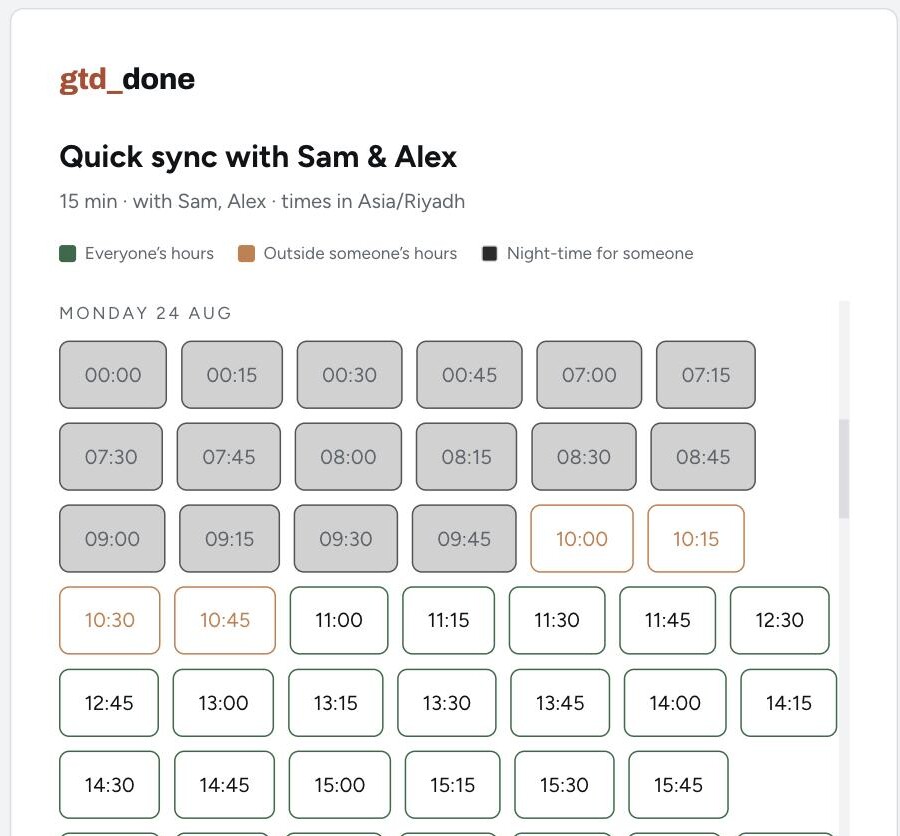
A shared booking page: slots coloured against every host's hours, in the visitor's zone.
Time
The thing competitors leave to a separate app.
- Work hours, peak and low energy windows, lunch, buffers, no-schedule days
- Set once; autoschedule and every booking link obey them
- Any number of Google calendars mapped in, personal and work; busy time from Basecamp mirrored
- One ledger out: every view reads the same calendar, and a client deadline can't land on a school pickup
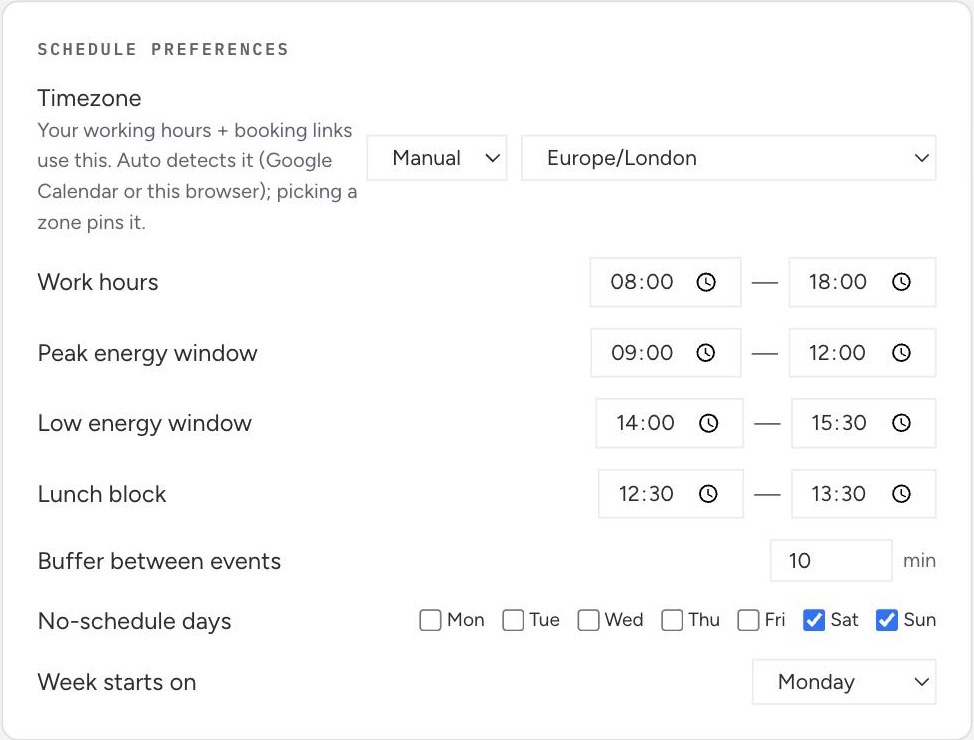
The hours, energy windows and buffers every autoschedule and booking link obeys.
The record
Plans change. The record stays.
- Finish a task and it turns green on the calendar for good; log the things that were never tasks too
- Where the hours went, by workspace, by project and by week
- Tasks completed, cycle time, done by due date, side by side
- Every week ends with an account of where the hours went, and next week gets planned from it, Top 3 first
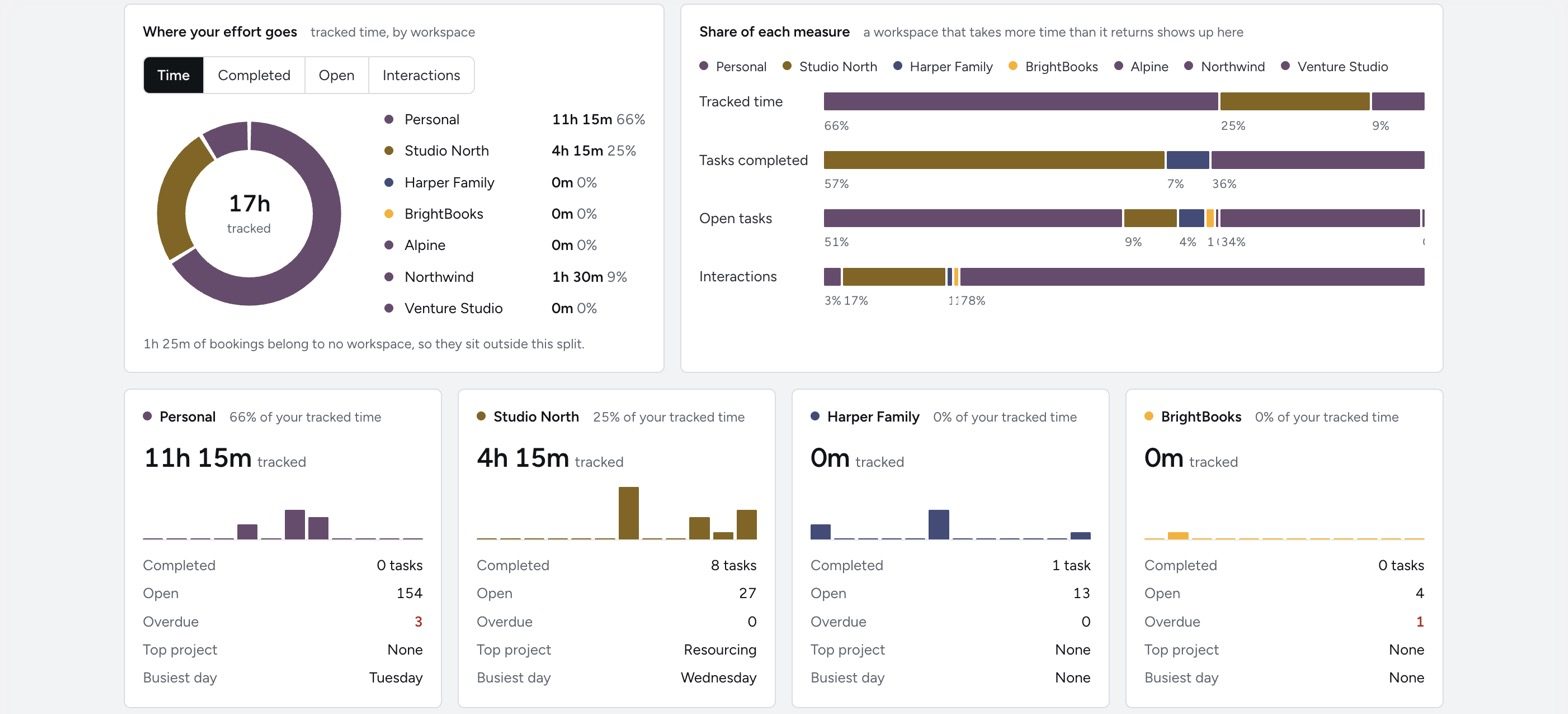
Where the effort went, by workspace, against what each one returned.
Giving back a day a week
For over a decade I built and scaled enterprise applications with teams spread across time zones, worked with investors who each wanted something different, and ran sales processes that dragged on for months. I did all of it while trying to keep a life.
Death by a thousand cuts wore me down. The update nobody read, the meeting that took four days to schedule, the commitment that lived in someone's head, the half hour spent remembering a decision I'd already made. Across a week those cuts cost a day I never got back.
emeris is one part of my attempt to give us all that day back (and some cash). It applies principles that already work (David Allen's Getting Things Done®, calendar-first planning, honest accounting of the hours) to the practices a founder runs on. Work others can see without asking. Time shared at the calendar. Automation wherever a human adds nothing. A record of what got done. And, I hope, some peace of mind.
This is a personal journey. I use emeris every day, and I build it for the version of me that was drowning in small things.

Founder · emeris
Use the whole thing for a month, no pressure, then decide.
Full access
Every feature, no restrictions, no credit card. Cancel by doing nothing.
Start your 30 daysAfter the trial, emeris is $4.99/month — or $4.24/month billed annually ($50.90/year). Sign up in 2026 and pay $2.99/month for life, 40% off, for as long as you stay. We'll ask for a card then, not before.
- Unlimited capture, tasks and projects
- Google Calendar sync, both ways, and the permanent time ledger
- Planner & autoschedule with energy windows and buffers
- Personal & shared booking links with time zone matching
- Team workspaces & delegates
- Home, Kanban, Timeline and Projects views
- Done log with streaks and history
- Full stats — time by project, colour and week
- All four themes
- Capture webhook, outbound webhooks, read-only MCP server and Basecamp sync
Waitlist members start with 90 days instead of 30.
79% less than Calendly and monday.com together.
Most teams pay for a scheduling tool and a task tool separately. emeris replaces both, at 63% less than Calendly Teams on its own and 50% less than monday Standard on its own.
| Scheduling + tasksemerisOne plan | SchedulingCalendlyTeams plan | Tasksmonday.comStandard plan | BothCalendly + mondayWhat teams actually buy | |
|---|---|---|---|---|
| Per seat / month | $4.24$4.99 billed monthly | ~$16~$20 billed monthly | ~$12~$14 billed monthly | ~$28~$34 billed monthly |
| Booking linksPersonal + shared, time-zone aware | Included | Included | — | Via Calendly |
| Tasks, projects, Kanban | Included | — | Included | Via monday |
| Autoschedule tasks into your calendarBy size and energy | Included | — | — | — |
| Permanent done log & time stats | Included | — | Dashboards on Pro, ~$19 | Partial |
| Free tier | 30-day full trial, no card | 1 event type, 1 calendar | Up to 2 seats, no calendar view | Limited |
| Your team, per year5 seats, annual billing | $254.50 | ~$960 | ~$720 | ~$1,680emeris saves ~$1,426 |
Competitor prices (~) are approximate: public list prices per seat, billed annually, converted to USD at the last check in August 2026. Check their sites for current pricing in your currency. Calendly Teams is the cheapest tier with team scheduling and round-robin. monday.com Standard is the cheapest tier with Calendar and Timeline views. Their free tiers exist but don't cover the features compared here.
What's important to you when managing your time? One-minute check →
Questions
Do I need to follow a productivity method to use this?+
What makes the booking system different from Calendly?+
How does autoscheduling decide where a task goes?+
Does it interfere with my existing calendar?+
What's a delegate?+
What happens when I invite someone as a project guest?+
Do project guests need their own subscription?+
Can I create tasks by email?+
Is there a mobile app?+
Does emeris track my time?+
What happens after the 30 days?+
Is anything held back during the trial?+
Can I connect my other tools?+
When does the beta open?+
Stop wondering where your week went.
Start the day with a plan that fits your energy. End it with a record of what you did, and plan next week from it.
That didn't save. Email hello@emeris.app and we'll add you by hand.
Early access rolls out weekly · Waitlist members get 90 days free, no card