
Get anything into emeris in seconds, from wherever you are.
Press n anywhere in emeris, forward an email, send a webhook or ask your AI assistant. Most items land in your inbox until you decide what to do with them. Five email addresses go further. They file a task in a column, log it as done or book it straight onto your calendar.
Capture a task the moment you think of it.
Capture in the moment
Two keys and a line of text put the thought somewhere safe in the middle of a meeting.
Email becomes work in one forward
Forward to your schedule address and the task is booked before you close the email. Forward to done and it's on the record.
Correspondence files itself
Every task and project has its own address. BCC it on a live thread and the emails land as notes, with attachments.
Four ways in, and you choose where each item lands.
Two keys from any screen.
n opens a new task from anywhere in emeris. ⌘K or / opens search. Type, save, carry on.
Your inbox waits for you.
Captured items sit in the Inbox column. Nothing is scheduled, assigned or filed until you say so. Give an item a size and it's ready to schedule.
Each email address files the task in a different place.
- Inbox lands it ready to sort.
- In progress lands it assigned to you, for work already under way.
- Someday parks it out of the way.
- Done logs it as finished.
- Schedule books it into your next free slot.
The subject becomes the title, the body the first note, and attachments come along. Full detail is in the email guide.
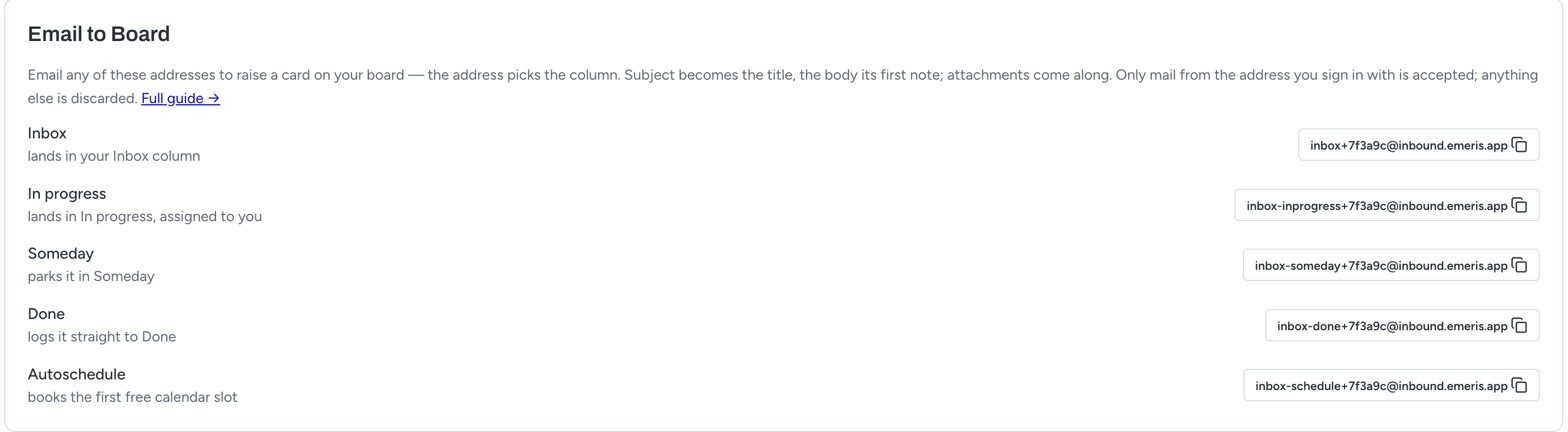
Any tool with a webhook can capture.
Zapier, Make, n8n, an iPhone Shortcut or a Slack workflow can post a line of text to your inbox. Recipes for each are in the integrations guide.
Your assistant captures too.
Connect Claude over MCP and it can add items to your inbox from a chat, or sort the inbox for you. See AI assistants.
Questions founders ask
Who can send to my capture addresses?
Only you, from the address you sign in with. Mail from anyone else is discarded, even with a valid address.
Which attachments come through?
Images, PDFs, text, CSV and Word, Excel and PowerPoint files, up to 10 MB each and 25 MB a message. Archives and scripts are skipped and the note says so.
Where do captured items land?
In your Personal workspace, assigned to you. Move them to a team workspace when you sort them.
What if the schedule address can't find a slot?
The task waits in your inbox with the reason on its note. The email is never lost.
Try emeris free for 30 days.
Every feature, for you and your team. No card to start.
Start free trial