
Give each task a size and emeris finds it time on your calendar.
A task in emeris carries a size, an energy level, a priority and a due date. That's what lets emeris put it on your calendar. Subtasks, dependencies, repeats and files sit on the same card, so a whole piece of work lives in one place.
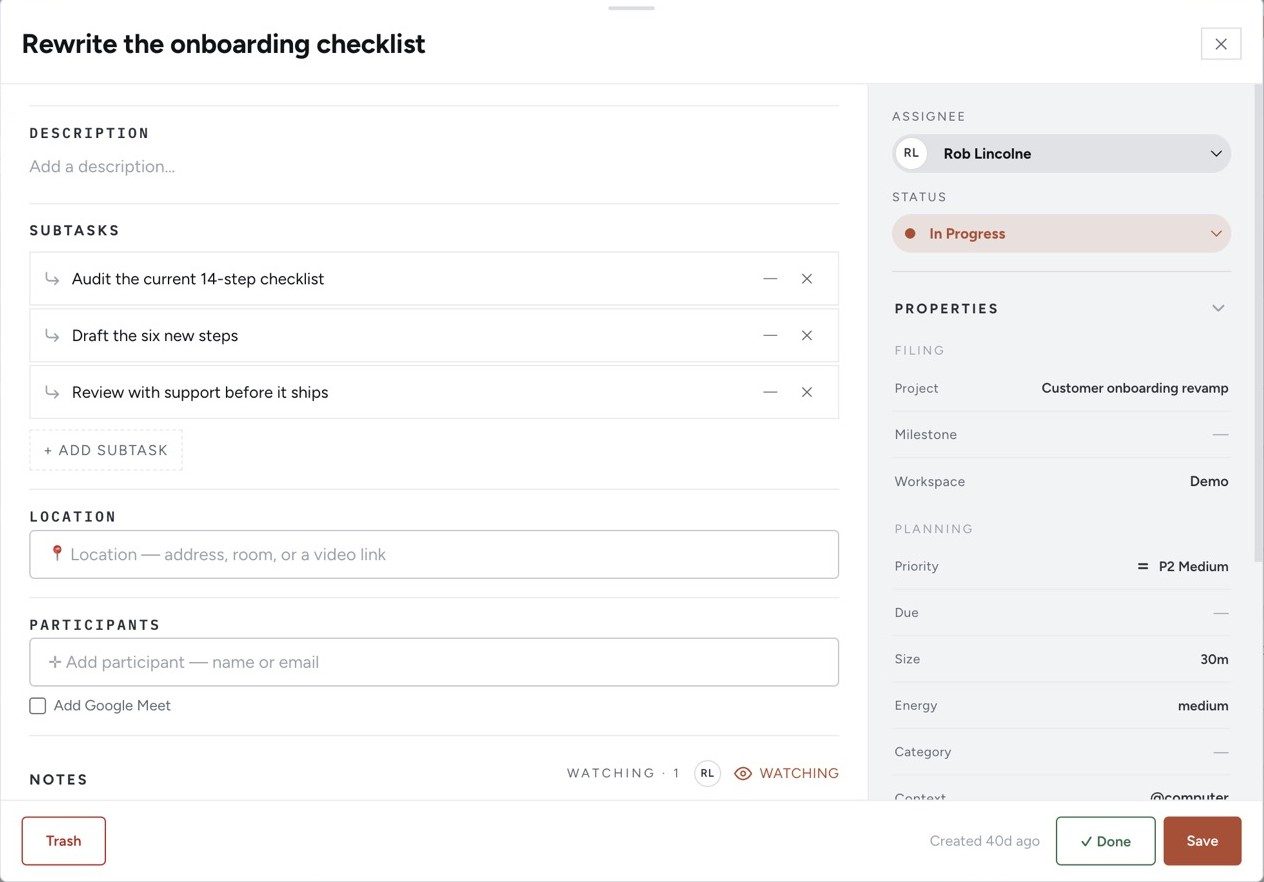
Every task fits on a calendar.
Real lengths, real blocks
A two-hour build gets a two-hour block and a quick call gets fifteen minutes, so the calendar shows what the day really holds.
Big work in sittings
Break a task into subtasks. Each gets its own size and its own slot, so a three-day job lands as separate blocks across your week.
Waiting work stays out of the way
Mark what a task is blocked by. It leaves your ready list until the blocker is done.
One card holds everything a piece of work needs.
Size, energy, priority and due date.
- Size is how long it takes, 5m, 15m, 30m, 1h or 2h.
- Energy is the focus it needs, low, medium or high.
- Priority runs Ultra, High, Medium, Low and orders what you look at.
- Due date is when the work is owed, which can differ from when it's booked.
Change any of them from the chips on a card without opening it.
Subtasks are tasks in full.
Each subtask carries its own size, energy, due date and schedule, and books separately from its parent. Finishing a parent never closes its children.
Name what a task is waiting on.
A blocked task waits until the task it depends on is done, so it stays out of the list of things you could start now. See Projects.
Repeats that never pile up.
Daily, weekly, monthly or every weekday. The next one appears when you finish this one, so ignored repeats never stack up behind you. Choose whether it waits in your inbox, books the same slot again or books wherever it next fits.
Files and versions on the card.
Drag files onto a task or email them to its address. A new version keeps the old one underneath, so nothing is overwritten.
Questions founders ask
Do I have to set size and energy?
Neither is required. Size sets how long a block is when emeris books it, and energy helps you choose what to pick up next.
Does priority change where a task lands?
No. Priority orders what you look at, and emeris books each task into the first free slot that fits its size.
What happens when I delete a task?
It goes to the trash and can be restored.
Which files can I attach?
Images, PDFs, text, CSV and Office files, up to 10 MB each. Archives, executables and scripts are refused.
Try emeris free for 30 days.
Every feature, for you and your team. No card to start.
Start free trial