
Your tasks live on your Google Calendar.
emeris writes each scheduled task to your Google Calendar as a real event and keeps the two in step. Move the event and the task follows. When its time passes the task is done, so one calendar holds both the plan and what happened.
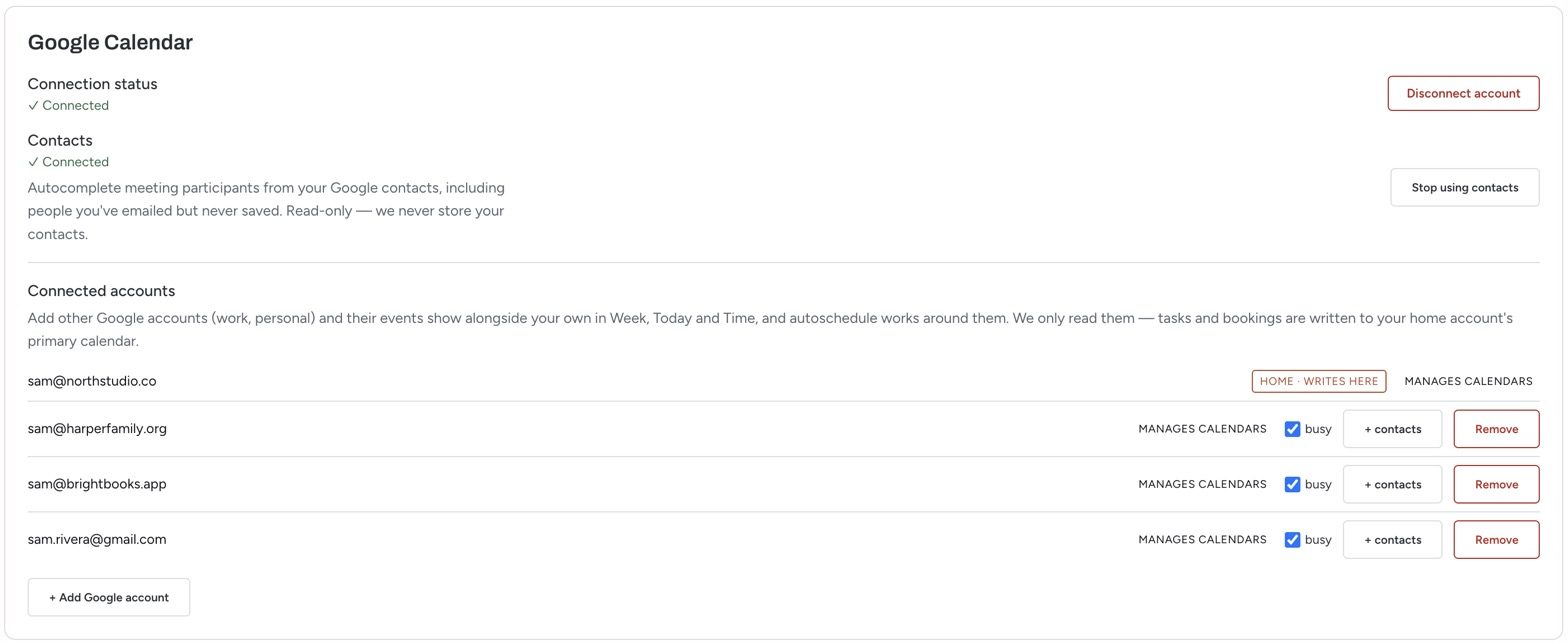
Your plan and your meetings share one calendar.
One calendar for every tool
Your booking links, Team week and AI assistant all read the calendar your tasks live on.
Done keeps itself
A scheduled task counts as done when its time passes, unless you moved it. You don't tick boxes to keep the record straight.
Every account counts
Connect work, personal and side-venture accounts. Each one holds time against you, so nothing gets booked over a promise you made elsewhere.
You connect each account once.
Connect your home account, then add the rest.
emeris writes its blocks to your home account. Every account after it is read only and still blocks scheduling. Secondary calendars inside an account come along too, so a Google account holding four calendars counts all four.
Each account carries two switches.
- Count as busy decides whether its events block scheduling.
- Offer its contacts decides whether its address book is suggested when you invite someone.
Move it anywhere and the task follows.
Drag a block on the Planner and the event moves in Google Calendar. Move the event in Google Calendar, from your phone or anywhere, and emeris picks up the new time when you next open your week.
emeris reads only whether you're busy.
Titles, attendees and locations stay in Google. Disconnect an account and its events leave your week straight away.
Your timezone moves with you.
Set a work location for a day, an office, home or a client site, and emeris schedules against that day's timezone. See Team availability.
Questions founders ask
Does emeris write to every calendar I connect?
No. emeris writes only to your home account. Every other account is read only.
What can emeris see in my meetings?
Free and busy time. Titles, attendees and locations stay in Google.
Which calendars does emeris support?
Google Calendar, including Google Workspace accounts. You can connect more than one.
What happens if I disconnect an account?
Its events leave your week immediately. Your tasks stay in emeris.
Try emeris free for 30 days.
Every feature, for you and your team. No card to start.
Start free trial